Free Open-Source Modern Graphical Interface for Secure File Deletion and Free-space Wiping on Windows.
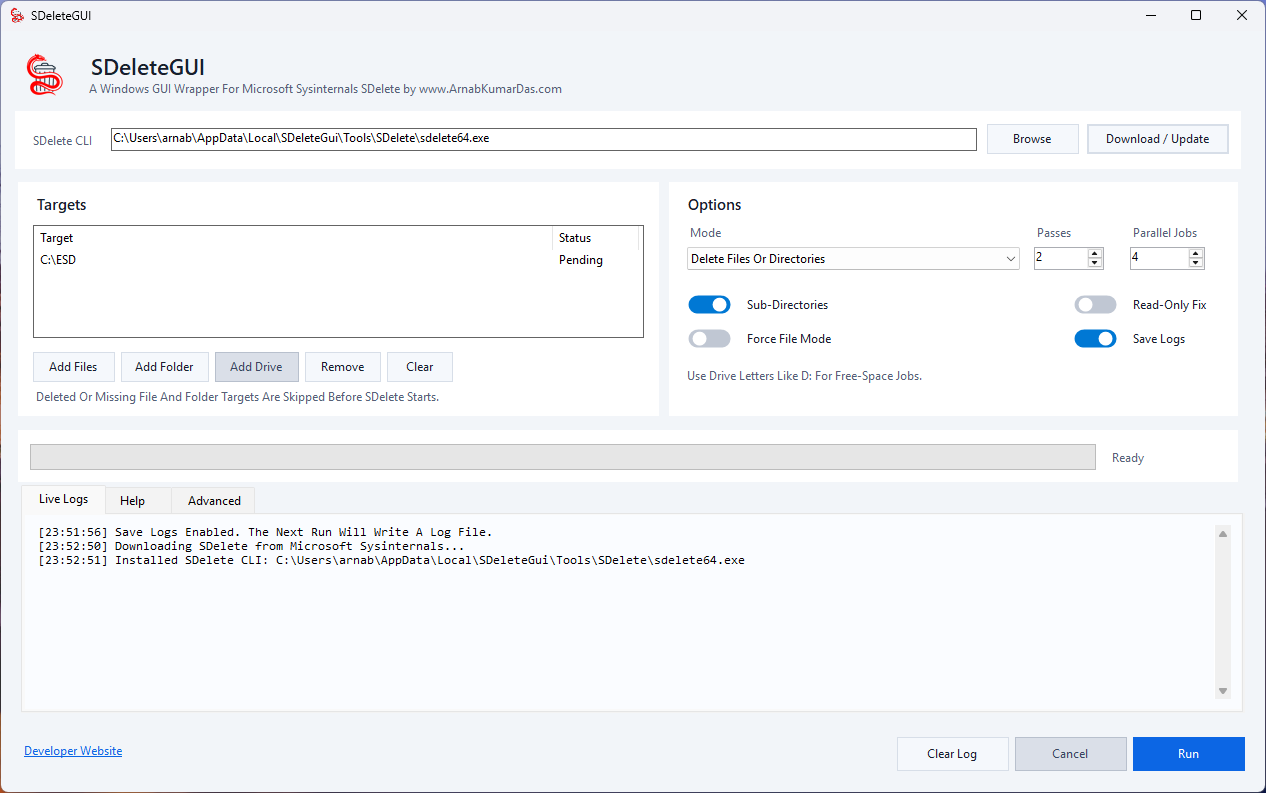
SDelete GUI brings the power of secure data destruction to users who prefer a clean and intuitive graphical interface over command-line tools. Built on top of trusted secure overwrite techniques from Microsoft, SDelete GUI allows users to permanently remove sensitive files, folders, and free disk space with just a few clicks.
Why SDelete GUI?
Traditional deletion only removes references to files, leaving data potentially recoverable using forensic or recovery software. SDelete GUI securely overwrites data before removal, helping protect confidential information from unauthorized recovery.
- Personal Privacy > Remove personal documents before selling a computer.
- Business Data Protection > Securely erase confidential files and customer records.
- Device Preparation > Clean storage devices before transfer or disposal.
- Digital Forensics Prevention > Reduce recovery possibilities from deleted data.
Key Features
- Secure File Deletion > Permanently erase individual files using configurable overwrite passes.
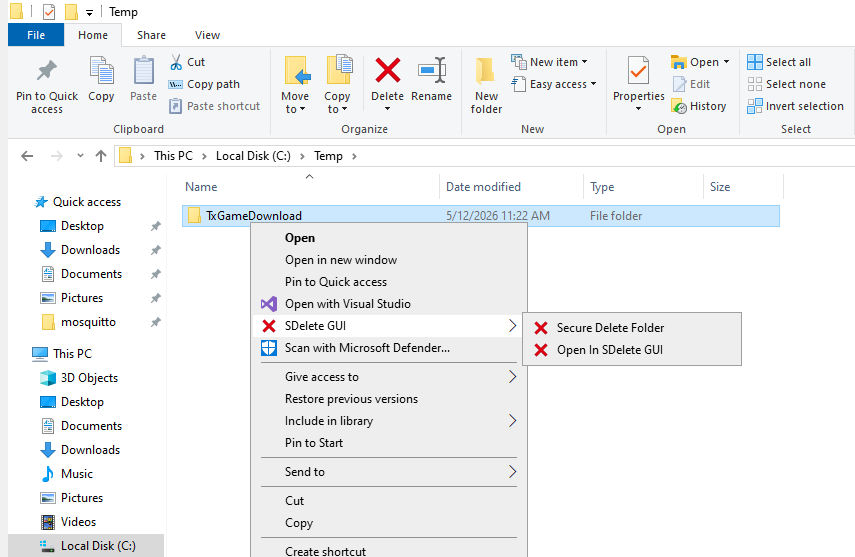
- Secure Folder Deletion > Delete entire directories including nested files and subfolders.
- Free Space Wiping > Clean unused disk space to remove traces of previously deleted files.
- Multiple Overwrite Passes > Choose the number of overwrite passes according to your security requirements.
- Progress Monitoring > Real-time progress tracking and operation status.
- Safe Confirmation System > Prevent accidental deletion through confirmation dialogs.
- Lightweight & Fast > Minimal system resource usage.
- Portable Option > Run without installation if desired.
Security Notice
SDelete GUI is designed to make deleted data significantly harder to recover. No software can guarantee absolute irrecoverability on every storage technology, particularly modern SSDs using wear leveling and TRIM operations. Users handling highly sensitive data should follow their organization’s security policies and storage-vendor recommendations.
System Requirements
- Windows 10 / 11
- 100 MB available storage
Disclaimer
Use this software carefully. Deleted files cannot be recovered after secure overwrite operations complete successfully. Always verify backups before performing permanent deletion operations. The authors are not responsible for data loss resulting from misuse of the software.
About SDelete
SDelete GUI is inspired by the functionality and concepts of Microsoft’s Sysinternals SDelete utility.
SDelete (Secure Delete) is a command-line tool developed by Mark Russinovich as part of the Sysinternals Suite, now maintained by Microsoft. It is designed to securely delete files and sanitize free disk space by overwriting data before removal, making recovery significantly more difficult using standard forensic recovery methods.
This GUI project provides a modern graphical user interface that makes these secure deletion concepts easier to use for everyday users while preserving the core principles behind secure data sanitization.
Credits
Original SDelete
- Developed by Mark Russinovich
- Part of the Sysinternals Suite
- Maintained and distributed by Microsoft
- Official documentation: Microsoft SDelete Documentation
Important Notice
SDelete GUI is an independent project. It is not affiliated with, endorsed by, or officially connected to Microsoft Corporation or the Sysinternals team. “SDelete”, “Sysinternals”, and related trademarks belong to their respective owners. This project is intended as a GUI implementation inspired by publicly documented secure deletion techniques and workflows.
Why Secure Deletion Is Necessary
When a file is deleted normally in Windows:
- The file contents usually remain on the storage device.
- Windows removes references to the file.
- The storage space is marked as available for reuse.
- Recovery software may still reconstruct the original data.
Because the actual data often remains until overwritten, sensitive information may be recoverable even after deletion. Secure deletion tools solve this problem by overwriting the data before removing it.
Theory Behind Secure Deletion
The basic principle is simple:
- Locate the file’s physical storage blocks.
- Overwrite the blocks with controlled patterns.
- Repeat the overwrite process if required.
- Remove filesystem references.
A simplified example:
Original data:
Confidential_Report.docx
Overwrite pass:
AAAAAAAAAAAAAAAAAAAA
Second pass:
00000000000000000000
Final deletion:
File entry removed
The goal is to reduce the possibility of recovering previous content from the storage medium.
How SDelete Works
According to Microsoft’s documentation, securely deleting normal files is straightforward because the file data can simply be overwritten. However, compressed, encrypted, sparse, and NTFS-managed files require additional handling.
SDelete uses NTFS and defragmentation APIs to identify the exact disk clusters used by these files and securely overwrite them.
For free-space cleaning, SDelete fills unused disk space with large temporary files, overwrites that space, and then removes those temporary files. This allows previously deleted data residing in unallocated space to be overwritten safely without corrupting active filesystem structures.
Original SDelete Command Usage
sdelete [-p passes] [-r] [-s] [-q] [-f] <file or directory [...]>

sdelete [-p passes] [-q] [-z|-c] <drive letter [...]>

sdelete [-p passes] [-q] [-z|-c] <physical disk number [...]>
Source: Microsoft Sysinternals Documentation.
Common SDelete Examples
Securely Delete A File
sdelete confidential.pdf
Use Multiple Overwrite Passes
sdelete -p 3 confidential.pdf
Performs three overwrite passes before deletion.
Securely Delete A Folder
sdelete -s -r C:\SensitiveData
Options:
-s= recurse subdirectories-r= remove read-only attributes
Clean Free Disk Space
sdelete -c C:
Securely overwrites unused space on drive C.
Zero Free Space
sdelete -z C:
Writes zeros to free space, often useful before shrinking virtual disks.
SDelete Parameters
| Parameter | Description |
|---|---|
-p | Number of overwrite passes |
-s | Recurse subdirectories |
-r | Remove read-only attributes |
-q | Quiet mode |
-c | Clean free space |
-z | Zero free space |
-f | Force file interpretation |
-nobanner | Hide startup banner |
Source: Microsoft Sysinternals documentation.
Storage Technology Considerations
Modern SSDs behave differently from traditional HDDs. Features such as Wear leveling, TRIM, Flash translation layers, Controller-level optimizations can affect how overwrite-based deletion operates internally. Microsoft documentation and security guidance recommend considering hardware-supported sanitization methods when strict compliance requirements exist. For highly sensitive environments, organizations should evaluate modern standards such as NIST SP 800-88 and hardware secure erase capabilities.
Project Philosophy
SDelete GUI was created to bring the power of secure deletion to users who may not be comfortable using command-line utilities. The objective is not to replace the excellent Sysinternals tools, but to make secure deletion more accessible without requiring users to memorize command-line syntax.
References
Microsoft Sysinternals SDelete: Official SDelete Documentation
Microsoft Sysinternals Suite: Sysinternals Suite Homepage
Created in appreciation of the work of Mark Russinovich and the Sysinternals team.
0 Comments